
ICAI SSP Sets Three CA Foundation Registration Cut-offs
Complete ICAI Foundation Course registration, confirm its status and know when to submit the separate exam form.
- Time
- One online session
- Difficulty
- Moderate
- Cost
- ₹9,000
- Steps
- 5
Before you start, have
- Class 10 pass or a recognised equivalent
- Your intended January, May or September Foundation examination month
- Access to the email account you use for SSP
- Every document requested by the live SSP Foundation form
Heads up: Passing Class 10 permits Foundation Course registration, but it does not by itself permit you to sit the Foundation examination.
Heads up: Foundation Course registration does not submit an examination form for a January, May or September attempt.
Heads up: Use the live SSP form for its current document requirements rather than relying on an old checklist.

By Naveen J D, Founder · Reviewed 27 Sept 2026
In brief
CA Foundation course registration is completed on ICAI's Self Service Portal, but it does not book your examination attempt. ICAI's 2024 FAQ sets a four-month study-period rule and separate January, May and September cut-offs, then requires a later online exam form.
Check your eligibility and target month
Confirm that you have passed Class 10 or a recognised equivalent before beginning. You may register at that point, but you can appear in Foundation only after appearing in Class 12 or a recognised equivalent. Choose your intended examination month before continuing: register by 1 January for May, 1 May for September, or 1 September of the previous year for January. ICAI describes these as the dates that meet its minimum four-month registration period in its 2024 New Scheme FAQ.
Open SSP as a first-time user
Go to the ICAI Self Service Portal and start as a First Time User if you do not already have SSP credentials. Use the Foundation entry-level registration route and keep the email account you use for SSP accessible. ICAI's 2026 SSP support guidance identifies SSP as the platform for students and directs new CA students to register there as First Time Users.
Complete the Foundation form and pay the fee
Enter the requested personal and academic details, then upload every item requested by the live form before submitting payment. The Foundation Course registration fee is ₹9,000, including the CA-course prospectus and Foundation study material, under ICAI's 2024 FAQ.
Confirm registration and access your material
Watch for ICAI's email containing credentials to order Foundation study material through the Centralised Distribution System. ICAI says hard-copy material becomes available after registration confirmation, and its 2026 CDS FAQ says Foundation students receive one coupon valid for one year from registration. If confirmation is missing, use the current student SSP support address, [email protected].
Submit the separate examination form
Do not stop after course registration if you intend to sit an examination. ICAI requires a separate online examination form for each Foundation session and says that form usually opens about two months before the examination. Check ICAI's examination announcements for the session-specific opening and closing dates.
You'll know it worked when
The task is complete when ICAI confirms your Foundation registration, you receive the CDS credentials for study material, and you have recorded the separate exam-form window for your intended session.
Keep the registration calendar in view
The course-registration date determines which Foundation examination month you can target. ICAI's January, May and September mapping is set out in its 2024 New Scheme FAQ.
Use the deadline that matches the examination month you intend to take, then wait for ICAI's separate exam-form announcement.
Foundation registration cut-off map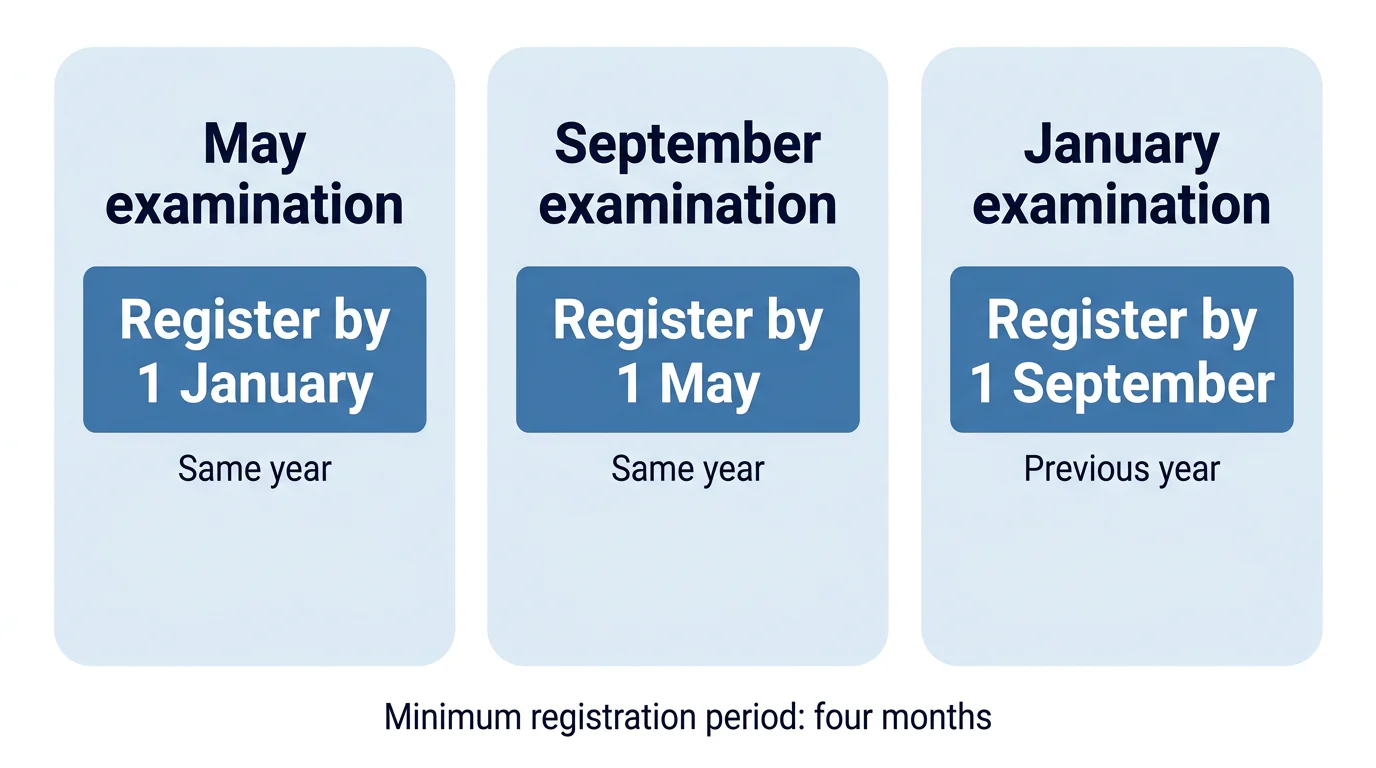
After your registration is confirmed, use the official material and choose a preparation format that suits your schedule. Our CA Foundation coaching guide can help you assess that next decision, and the 90-day syllabus plan can help structure revision.
Keep reading



Frequently asked
Yes. ICAI's 2024 FAQ allows Foundation Course registration after passing Class 10 or a recognised equivalent. However, registration alone does not make you eligible to sit the Foundation examination, because you must also have appeared in the Class 12 examination or recognised equivalent before appearing.
No. ICAI treats Foundation Course registration and the examination application as separate actions. After completing course registration, you must submit an online examination form for the specific January, May or September session when ICAI opens that form window.
Check the email account used for SSP because ICAI sends successful Foundation registrants CDS credentials for ordering study material. For a student-related SSP issue, ICAI's 2026 support page directs users to [email protected]; it also says the former [email protected] address was deactivated from 15 August 2026.
Under ICAI's 2024 FAQ, register by 1 January for a May Foundation examination, by 1 May for a September examination, and by 1 September of the preceding year for a January examination. These dates apply ICAI's stated minimum four-month registration period.
After successful Foundation registration, ICAI says it emails credentials for the Centralised Distribution System. ICAI's 2026 CDS FAQ says a Foundation student receives one coupon, valid for one year from the registration date, to select the required study material.
Prepare for Foundation after your ICAI registration
We offer CA Foundation classes online and offline with live and recorded sessions, study materials and mock tests.
Explore CA Foundation coaching